MyPixel Guard
Find and remove the hidden location, device and author details inside your photos, on your own computer, before you share them.
AvailabilityLive and free to use
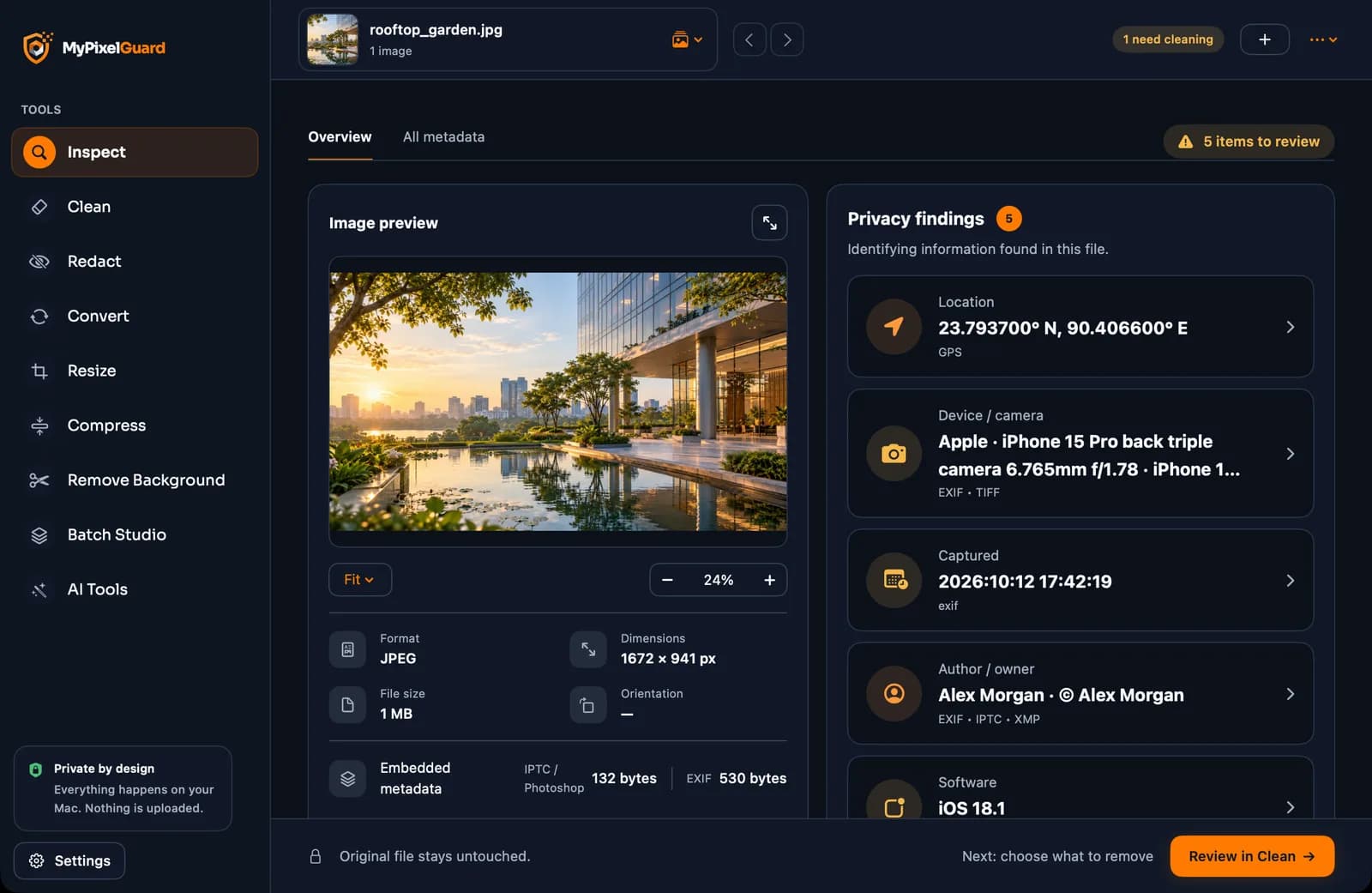
- Inspect
- Clean
- Redact
- Batch Studio
Demo screens use stock photos and fictional personal details.
Why we built it
Every photo says more than you think
A single photo can carry your exact GPS location, your phone model, the time you took it and your name, and sometimes labels that mark it as AI-made. Anyone you send it to can read all of it.
We needed a reliable way to clean that information before sharing images, without sending them to someone else’s server first, because uploading a private photo to strip its private data defeats the point. So we built a desktop app that does everything on your own computer.
It worked well enough for our own use that we opened it to everyone, free, with no account.
- 01
Exact GPS location
Coordinates saved by the camera can reveal where you live, work or travel.
- 02
Camera and device
The make, model and lens of the device that took the photo.
- 03
Name and copyright
Author, owner and copyright text stored inside the file.
- 04
AI labels and history
C2PA Content Credentials, XMP tags and edit history that platforms read.
How it works
3 steps, no learning curve.
- 1
Add your images
Drag them in or choose them from your computer. Whole folders work too.
- 2
Pick a tool
Inspect, Clean, Redact, Convert, Resize, Compress, Remove Background or Batch Studio, from the sidebar.
- 3
Review and save
Check the preview and choose a folder. A new copy is saved and checked; your original stays exactly as it was.
What it does
Features, in detail.
Inspect
- Reads EXIF, IPTC, XMP, GPS and C2PA data
- Shows evidence of AI provenance, without claiming to be a definitive AI detector
Clean
- Choose exactly what to remove
- Preview what is removed and what is kept
- Asks before removing Content Credentials
- Every saved file is read back to confirm the data is really gone
Redact
- Finds faces and text on your device and blurs them
- Every detected region is numbered for review, with an exact preview before export
Convert, resize and compress
- JPEG, PNG, TIFF, plus HEIC on Mac and WebP where supported
- Exact pixels or percentages, with presets for social media
- Quality slider with before and after preview, and a target file size
Remove Background
- Runs on your computer, with no upload
- Only adds transparency: the subject’s colours and resolution are untouched
- Saved without quality loss as PNG or TIFF
Batch Studio
- One recipe applied to many photos at once
- Progress, cancel, and a list of any files that failed
Specifications
Product details
- Status
- Live and free
- Mac
- macOS 13 or later (Remove Background needs macOS 14)
- Windows
- Windows 10 or 11, 64-bit
- Languages
- English and Bangla
- Formats
- JPEG, PNG and TIFF everywhere; HEIC read and write on Mac, WebP where supported; on Windows HEIC can be read but not written
- Account
- None needed
- Processing
- On your computer; images are never uploaded and no internet connection is needed
- Originals
- Never changed; results go to a folder you choose and never overwrite existing files
- Mac installer scan
- 0 of 59 antivirus engines flagged it on VirusTotal
- Built with
- Swift (Mac app); Rust, Tauri and React (Windows app)
Good to know
Honest limits
- Removing metadata cannot erase invisible watermarks woven into the pixels, such as SynthID.
- Finding no metadata does not prove an image was made by a person.
- Automatic face and text detection can miss things or mark the wrong area, so always review before you share.
- Converted, resized and compressed copies are new files and never carry Content Credentials.
FAQ
Questions and answers.
Is MyPixel Guard really free?
Yes. It is free to download and use, with no account and no sign-up.
Does it upload my photos?
No. Every tool runs on your own computer, and it works offline.
How do I remove the GPS location from a photo?
Add the photo and choose Clean. It removes the GPS location, camera details and dates, saves a clean copy in the folder you choose, and checks the result.
Will it change my original image?
Never. Results are saved as new copies in a folder you choose, and existing files are never overwritten.
Can it remove AI watermarks like SynthID?
No. It removes metadata labels such as C2PA Content Credentials and AI tags in XMP or IPTC, but it cannot remove invisible watermarks woven into the pixels.
What is C2PA or Content Credentials?
A signed record inside an image that describes how it was made or edited. Platforms such as Facebook and Instagram can read it to add labels. MyPixel Guard shows it and, with your confirmation, removes it.
Does removing the background reduce quality?
No. It only adds a transparency layer; the subject’s colours and resolution are not changed, and PNG or TIFF files are saved without compression loss. Detection depends on the photo, so check the preview before saving.
Why would a software company give away a tool?
We built it for our own work first. Opening it up costs us little, and it shows how we build software: careful with people’s data and honest about limits.
Built by Agentiq BD
Need software like MyPixel Guard for your own business?
We build our own products with the same team and the same care as client work. Tell us the problem; we will say honestly what fits.